Service Catalog
The service catalog maps business services to their technical dependencies, enabling impact analysis, compliance tracking, and operational visibility.
Business services
A business service represents a capability delivered to the organization or its customers — "Customer Portal," "Payment Processing," "HR System," etc.
- Navigate to Services → Business Services.
- Click Add Service.
- Provide: name, description, owner, and criticality (Critical / Non-Critical).
Service components
Components are the technical building blocks that support a business service:
- From the service detail page, click Add Component.
- Link:
- Assets — servers, databases, network devices.
- Software — applications running on those assets.
- Subscriptions — SaaS services the business service depends on.
- Other services — upstream or downstream service dependencies.
Dependency mapping
The topology view shows the complete dependency graph for a service:
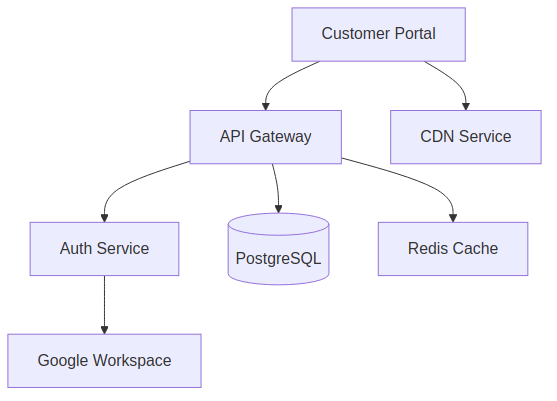
The dependency_graph.py utility resolves transitive dependencies — if Service A depends on Service B which depends on Database C, the graph shows all three levels.
Impact analysis
When an incident or change affects a component:
- Navigate to the affected asset or service.
- The Impact section shows all business services that depend on it.
- This informs incident severity assessment and change approval decisions.
Compliance context
Services can be linked to:
- Policies that govern the service.
- Compliance controls the service must satisfy.
- Security activities that protect the service.
- Risks that threaten the service.
This provides a unified view of a service's compliance posture.