Contracts
Track contract lifecycles with suppliers, including line items, renewal dates, and document attachments.
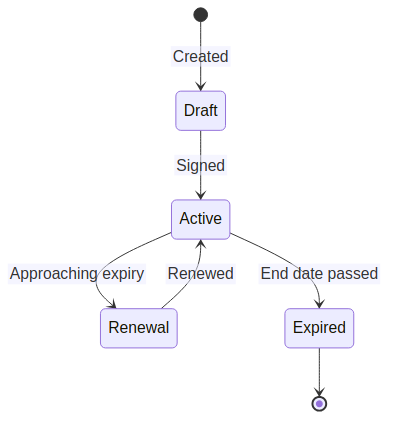
Contract lifecycle
Creating a contract
- Navigate to Vendors → Contracts.
- Click Add Contract.
- Link to a supplier.
- Set start date, end date, and value.
- Add contract items (line items) with individual descriptions and costs.
- Upload the signed contract document as an attachment.
Renewal tracking
- Contracts approaching their end date appear on the dashboard and in renewal reports.
- Notifications are sent before expiry based on configured lead times.
- Renewing a contract creates a new contract record linked to the original.
Document management
Attach supporting documents to any contract:
- Signed agreements, amendments, SLAs.
- Vendor security assessments.
- Pricing schedules.