Kubernetes Deployment (Helm)
Deploy OpsDeck on Kubernetes using the included Helm chart, with support for internal or external PostgreSQL, persistent storage, and Ingress.
Architecture
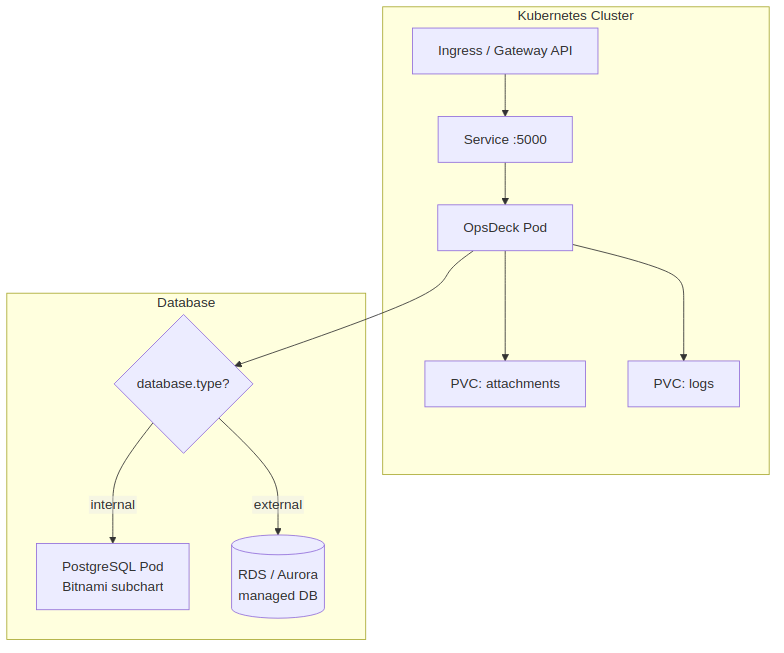
Prerequisites
- Kubernetes cluster v1.19+
- Helm 3.0+
kubectlconfigured for your cluster
Chart structure
helm/
├── Chart.yaml          # Chart metadata and PostgreSQL subchart dependency
├── Chart.lock
├── values.yaml         # Default configuration
├── charts/             # Bundled PostgreSQL subchart
└── templates/
    ├── deployment.yaml
    ├── service.yaml
    ├── ingress.yaml
    └── pvc.yaml
Installation
1. Create namespace and secrets
kubectl create namespace opsdeck

kubectl create secret generic opsdeck-secrets \
  --from-literal=secret-key='$(openssl rand -hex 32)' \
  --from-literal=admin-email='admin@yourcompany.com' \
  --from-literal=admin-password='SecurePassword123!' \
  -n opsdeck
2. Configure values
The key decision is database mode — internal (deploys a PostgreSQL pod) or external (uses an existing database like RDS/Aurora):
The Bitnami PostgreSQL subchart is disabled by default. To deploy an in-cluster database, enable it explicitly:
# values.yaml
database:
  type: internal

postgresql:
  enabled: true        # Must be set to true — disabled by default
  auth:
    username: opsdeck
    password: opsdeck_password
    database: opsdeck_db
  primary:
    persistence:
      enabled: true
      size: 1Gi
Warning
Internal PostgreSQL is not designed for multi-replica deployments. Use external PostgreSQL for high availability.
3. Configure persistent storage
persistence:
  logs:
    enabled: true
    size: 500Mi
    storageClass: ""       # Uses cluster default
    existingClaim: ""      # Or reference an existing PVC

  attachments:
    enabled: true
    size: 5Gi
    storageClass: ""
    existingClaim: ""
4. Install
5. Verify
Ingress
Enable and configure Ingress in values.yaml:
ingress:
  enabled: true
  className: nginx
  annotations:
    cert-manager.io/cluster-issuer: letsencrypt-prod
  hosts:
    - host: opsdeck.yourcompany.com
      paths:
        - path: /
          pathType: Prefix
  tls:
    - secretName: opsdeck-tls
      hosts:
        - opsdeck.yourcompany.com
ArgoCD deployment
For GitOps workflows, create an ArgoCD Application manifest:
apiVersion: argoproj.io/v1alpha1
kind: Application
metadata:
  name: opsdeck
  namespace: argocd
spec:
  project: default
  source:
    repoURL: 'https://github.com/pixelotes/opsdeck.git'
    targetRevision: HEAD
    path: helm/
    helm:
      valueFiles:
        - values.yaml
  destination:
    server: 'https://kubernetes.default.svc'
    namespace: opsdeck
  syncPolicy:
    automated:
      prune: true
      selfHeal: true
    syncOptions:
      - CreateNamespace=true
Gateway API
As an alternative to Ingress, OpsDeck supports the Kubernetes Gateway API:
gatewayApi:
  enabled: true
  gatewayName: "my-gateway"
  namespace: "default"
  hostname: "opsdeck.example.com"
This creates an HTTPRoute resource pointing to the OpsDeck service. Ensure your cluster has a Gateway API implementation installed (e.g., Envoy Gateway, Istio, Cilium).
Logging sidecar
The chart supports a Filebeat sidecar for shipping logs to Elasticsearch:
loggingSidecar:
  enabled: true
  image:
    repository: docker.elastic.co/beats/filebeat
    tag: 8.5.1
  elasticsearch:
    host: "elasticsearch"
    port: 9200
    protocol: "http"
    username: "elastic"
    password: "changeme"
When enabled, Filebeat runs alongside the OpsDeck container and forwards application logs in ECS format.
Scaling
OpsDeck can run multiple replicas behind the Kubernetes Service load balancer:
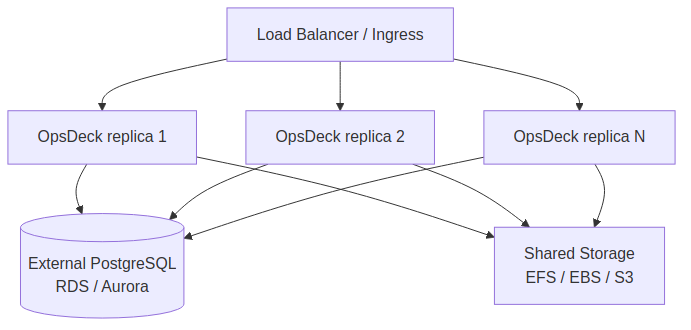
Requirements for multi-replica:
- External PostgreSQL — internal PostgreSQL is a single pod and not designed for HA.
- Shared storage for attachments — use a ReadWriteMany PVC (EFS) or S3-compatible storage so all replicas access the same files.
- Identical
SECRET_KEYacross all replicas (from the shared Kubernetes Secret).
values.yaml reference
| Key | Default | Description |
|---|---|---|
image.repository |
pixelotes/opsdeck |
Container image |
image.tag |
latest |
Image tag |
image.pullPolicy |
IfNotPresent |
Pull policy |
service.type |
ClusterIP |
Service type |
service.port |
5000 |
Service port |
database.type |
internal |
internal or external |
postgresql.enabled |
false |
Enable internal PostgreSQL pod (must set true for internal mode) |
postgresql.auth.username |
opsdeck |
Internal DB username |
postgresql.auth.password |
opsdeck_password |
Internal DB password |
postgresql.auth.database |
opsdeck_db |
Internal DB name |
persistence.logs.enabled |
true |
Enable log persistence |
persistence.logs.size |
500Mi |
Log volume size |
persistence.attachments.enabled |
true |
Enable attachment persistence |
persistence.attachments.size |
5Gi |
Attachment volume size |
ingress.enabled |
false |
Enable Ingress resource |
gatewayApi.enabled |
false |
Enable Gateway API HTTPRoute |
loggingSidecar.enabled |
false |
Enable Filebeat logging sidecar |
existingSecret |
"" |
Name of an existing Secret for env vars (Sealed Secrets, external-secrets) |