Docker Compose Deployment
Production-grade deployment using Docker Compose with PostgreSQL, persistent storage, and health checks.
Prerequisites
- Docker Engine 24+
- Docker Compose v2
docker-compose.yml
The repository includes a docker-compose.yml configured for development (debug mode, demo data, no healthcheck on the web service). For production, use the following as a starting point:
services:
  web:
    build:
      context: .
    ports:
      - "5000:5000"
    volumes:
      - ./data/attachments:/app/data/attachments
    environment:
      - DATABASE_URL=postgresql://opsdeck:${DB_PASSWORD}@db:5432/opsdeck
      - SECRET_KEY=${SECRET_KEY}
      - FLASK_DEBUG=0
      - DEFAULT_ADMIN_EMAIL=${ADMIN_EMAIL:-admin@example.com}
      - DEFAULT_ADMIN_INITIAL_PASSWORD=${ADMIN_PASSWORD:-admin123}
    env_file:
      - .env
    depends_on:
      db:
        condition: service_healthy
    healthcheck:
      test: ["CMD", "curl", "-f", "http://localhost:5000/health"]
      interval: 30s
      timeout: 10s
      retries: 3
      start_period: 40s
    restart: unless-stopped

  db:
    image: postgres:16-alpine
    restart: unless-stopped
    environment:
      POSTGRES_USER: opsdeck
      POSTGRES_PASSWORD: ${DB_PASSWORD}
      POSTGRES_DB: opsdeck
    volumes:
      - postgres_data:/var/lib/postgresql/data
    healthcheck:
      test: ["CMD-SHELL", "pg_isready -U opsdeck -d opsdeck"]
      interval: 10s
      timeout: 5s
      retries: 5

volumes:
  postgres_data:
Configuration
Create a .env file with production values:
SECRET_KEY=your-long-random-secret-key-here
DB_PASSWORD=strong-database-password
ADMIN_EMAIL=admin@yourcompany.com
ADMIN_PASSWORD=InitialSecurePassword123!
Danger
Never commit .env with production credentials to version control.
See Environment Variables for the full reference.
Build and run
The entrypoint.sh script handles first-run initialization automatically:
- Installs the enterprise plugin if
ENTERPRISE_ENABLED=Trueand the plugin directory exists. - Detects and recovers stale Alembic revisions (e.g., after a migration squash).
- Runs
flask db upgradeto apply database migrations. - Runs
flask init-dbto create the admin user. - Runs
flask seed-db-prodto load compliance frameworks and threat catalogs. - Runs
flask seed-db-demodataifSEED_DEMO_DATA=True(development only). - Seeds enterprise data (
flask seed-connectors,flask seed-ai-profiles) if enterprise is enabled. - Starts Gunicorn with the configured workers and threads.
Verify the deployment:
Data persistence
| Data | Container path | Host mount |
|---|---|---|
| Database | /var/lib/postgresql/data |
postgres_data named volume |
| Attachments | /app/data/attachments |
./data/attachments bind mount |
| Logs | /app/logs |
Optional bind mount |
TLS termination
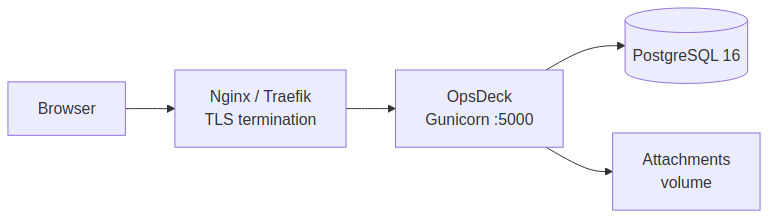
Do not expose port 5000 directly to the internet. Place a reverse proxy in front:
server {
    listen 443 ssl;
    server_name opsdeck.yourcompany.com;

    ssl_certificate /etc/letsencrypt/live/opsdeck.yourcompany.com/fullchain.pem;
    ssl_certificate_key /etc/letsencrypt/live/opsdeck.yourcompany.com/privkey.pem;

    location / {
        proxy_pass http://127.0.0.1:5000;
        proxy_set_header Host $host;
        proxy_set_header X-Real-IP $remote_addr;
        proxy_set_header X-Forwarded-For $proxy_add_x_forwarded_for;
        proxy_set_header X-Forwarded-Proto $scheme;
    }
}
Network isolation
Isolate the database from external access:
Performance tuning
Gunicorn workers and threads. Configured via environment variables:
GUNICORN_WORKERS— number of worker processes (default:2).GUNICORN_THREADS— threads per worker (default:4).
The entrypoint uses the gthread worker class with --max-requests 1000 and --max-requests-jitter 50 to periodically recycle workers and prevent memory leaks.
Database connection pool. Configure in .env or application config:
Container resource limits:
Backup
See Backup & Restore for automated backup scripts.
Quick manual backup:
# Database
docker-compose exec -T db pg_dump -U opsdeck opsdeck | gzip > backup_$(date +%Y%m%d).sql.gz

# Attachments
tar -czf attachments_$(date +%Y%m%d).tar.gz ./data/attachments
Troubleshooting
Container won't start. Check docker-compose logs web. Common causes: wrong DATABASE_URL, port 5000 already in use, missing .env file.
Database migration errors. Run docker-compose exec web flask db upgrade manually to see detailed errors.
Performance issues. Check docker stats for resource usage. Enable query logging with SQLALCHEMY_ECHO=True to find slow queries.