Risk Register
The risk register tracks identified threats to your organization, their scoring, treatment plans, and evolution over time.
Creating a risk
- Navigate to Security → Risks.
- Click Add Risk.
- Fill in:
- Title and description of the threat.
- Category — selected from the risk taxonomy (or create a custom category).
- CIA classification — which pillar is threatened: Confidentiality, Integrity, Availability, or a combination.
- Owner — the person responsible for managing this risk.
- Score the risk (see below).
- Link affected items — assets, services, suppliers, or compliance controls.
Risk scoring
Each risk is scored on two axes:
| Dimension | Scale | Description |
|---|---|---|
| Impact | 1–5 | Consequence if the risk materializes |
| Likelihood | 1–5 | Probability of occurrence |
Inherent risk = Impact × Likelihood (before any mitigation).
After documenting mitigating controls (linked security activities), set the residual risk — the remaining risk level after controls are applied.
Risk lifecycle
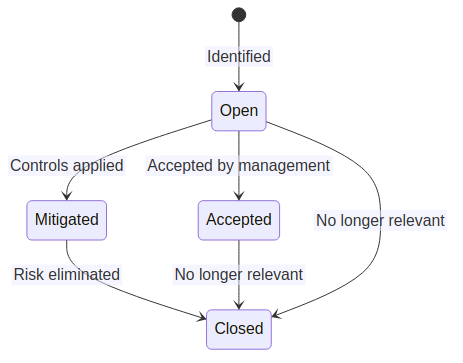
Risk history and trending
Every time a risk's score, status, or treatment plan changes, a RiskHistory record is created. The risk detail page shows a timeline of changes, enabling trending analysis across review cycles.
Risk catalog
OpsDeck includes a predefined risk catalog (CatalogRisk) with common IT risks organized by category. Use the catalog as a starting point when conducting risk assessments — select relevant risks and add them to your register with organization-specific scoring and context.
Linking risks to compliance
Risks can be linked to framework controls to show how identified threats map to compliance requirements. Conversely, compliance gaps can generate new risk entries. This bidirectional linking ensures that risk management and compliance management reinforce each other.